A step-by-step build of the collection path: an AEM as a Cloud Service site emitting an Adobe Client Data Layer, a Tags property carrying the Web SDK, a datastream routing events into a dataset, and pageview data landing in Experience Platform. Every screen below is a real Adobe UI capture, not a mock-up.
You asked me to build this from the ZeroBag Adobe documentation dump. I need to be straight with you about what that dump could and could not give me, because it changes how much weight to put on each part.
| Element | Tier | Where it came from |
|---|---|---|
| Web SDK definition, Edge Network role | T1 | Your corpus: AEP-10-platform-14…web-sdk-tutorial, AEP-02-sdk-01…datastreams |
| Datastream / dataset concepts | T1 | Your corpus: AEP-02-sdk-01-01-AEP-datastreams.md, AEP-05-datasets |
| The AEM → Web SDK integration itself | LIVE | Not in your dump. Zero AEM documentation was collected. Sourced live from Experience League and the AdobeDocs GitHub repo on 2026-10-19 |
| All 29 screenshots | LIVE | 16 published PNGs from AdobeDocs/experience-manager-learn.en; 13 frames I extracted from Adobe's own tutorial screen recordings |
| Identity contract commentary | T3 | Your design, from 02-MY-PROFILE.md — not an Adobe requirement |
https://example.com/jacket.jpg and
https://example.com/shoes.jpg, which are placeholders inside sample payloads. Every real image was
dropped by the HTML→Markdown conversion. So "use as many actual UI screenshots as possible" could not be satisfied
from the dump at all — it required live sourcing. Flagging that because it tells you something about the corpus:
any tutorial page in it is missing its visual half.
last-substantial-update metadata is
2023-04-26, and the tutorial screenshots show April 2023 timestamps in the AEP UI. The
concepts and sequence are current; specific screen layouts, the "Offer Decisioning" service option, and
navigation labels will have moved. Treat the screenshots as teaching the shape of each screen, not the
exact pixels you will see today.
Before the clicks. This is the thing most people get wrong when they describe Web SDK as "the analytics tag."
window.adobeDataLayerAEM → Client Data Layer. AEM renders components. Without a standard contract, every tag would need to know
AEM's DOM, which changes with templates and component versions. The Adobe Client Data Layer is a JS object
AEM Core Components populate automatically — window.adobeDataLayer — carrying component state and
firing events like cmp:show. It decouples what the page knows from what the tag reads.
That decoupling is the whole reason an implementation survives a redesign.
Client Data Layer → Web SDK. Web SDK does not scrape the DOM. It sends a structured XDM payload. Data elements are the bridge: small functions that pull a value out of the data layer and expose it to a rule. This is where you decide your event's shape, and it is the step that most directly determines whether your profile data is trustworthy.
Web SDK → Edge → datastream. The critical architectural point, and the one your corpus
(AEP-02-sdk-01-01-AEP-datastreams.md) supports: the website does not know about Adobe
destinations. Web SDK sends one XDM event to the Edge Network. The datastream — configured server-side,
not in the page — decides which sandbox it lands in and which datasets or applications receive it. Adding Adobe
Analytics, or Journey Optimizer, or a warehouse export later is a datastream change, not a re-tag of the
site. One collection, many consumers, no redeploy.
AEP-10-platform-14…web-sdk-tutorial.md
Both sides need access, and this is where implementations stall more often than in any technical step. LIVE AEM Web SDK tutorial, Prerequisites
Missing permissions are granted through the Adobe Admin Console. Your corpus also lists the finer-grained tag
rights needed for a full implementation — T1
AEP-10-platform-14…web-sdk-tutorial.md:
| Surface | Permission |
|---|---|
| Data Collection | Platforms — Web, and Edge if licensed |
| Property Rights | Approve, Develop, Edit Property, Manage Environments, Manage Extensions, Publish |
| Company Rights | Manage Properties |
| Data Modeling | Manage Schemas, View Schemas |
| Identity Management | Manage Identity Namespaces, View Identity Namespaces |
| Data Collection (AEP) | Manage Datastreams, View Datastreams |
window.adobeDataLayer in the console and get an object back — and you know whether you are on AEMaaCS or AEM 6.5, because Step 6 will fork on it.Everything downstream is demonstrated against WKND, Adobe's sample AEM Sites project. In your own estate this step is simply "the site exists" — but the two properties that matter are that it runs AEM as a Cloud Service and uses Core Components, because those are what make the data layer appear without custom code.
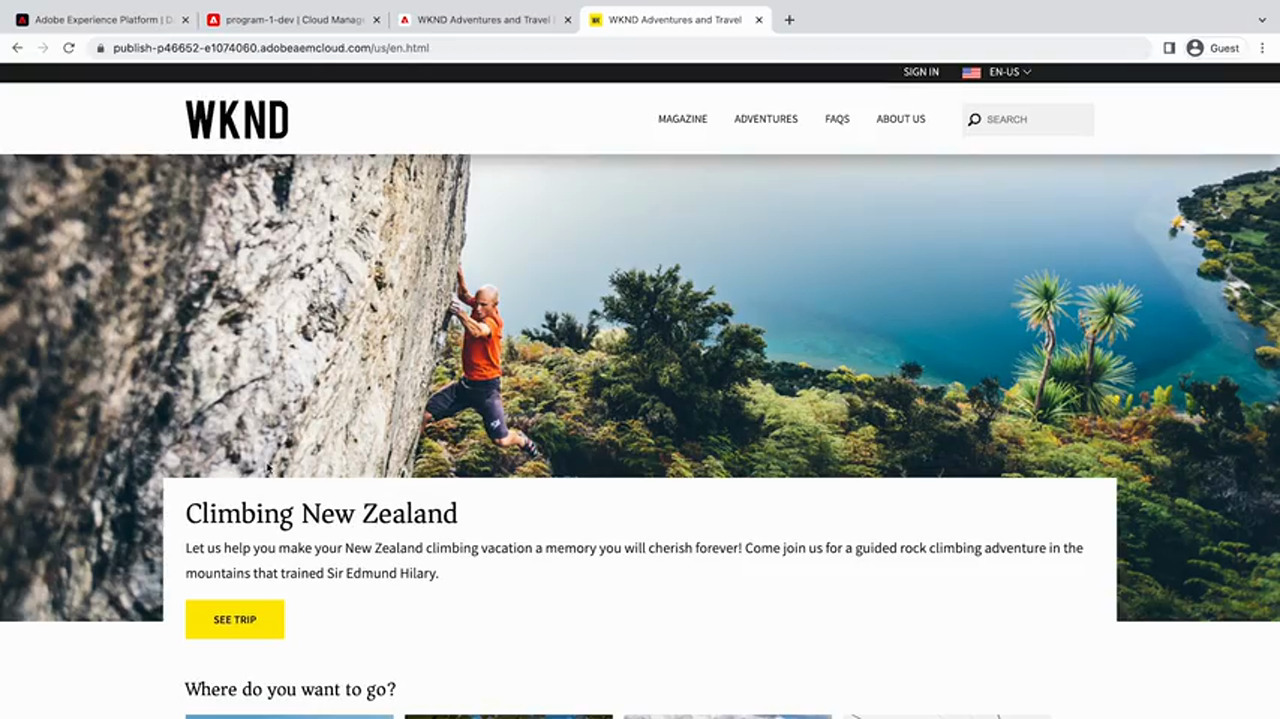
window.adobeDataLayer in the console. If it is undefined,
the components are not emitting a data layer and nothing downstream will work.window.adobeDataLayer is undefined, which of the four hops has failed, and what does that tell you about the remaining steps?dc:/repo:/xdm: keys) and what event wakes the rule (cmp:show) — before touching Tags.You cannot configure data elements in Step 5 without knowing what the layer exposes. This is the step people skip and then guess at.

cmp:show event as it appears in the browser console when a component enters view —
the trigger the rule in Step 5 listens for.
AdobeDocs/experience-manager-learn.en · adobe-client-data-layer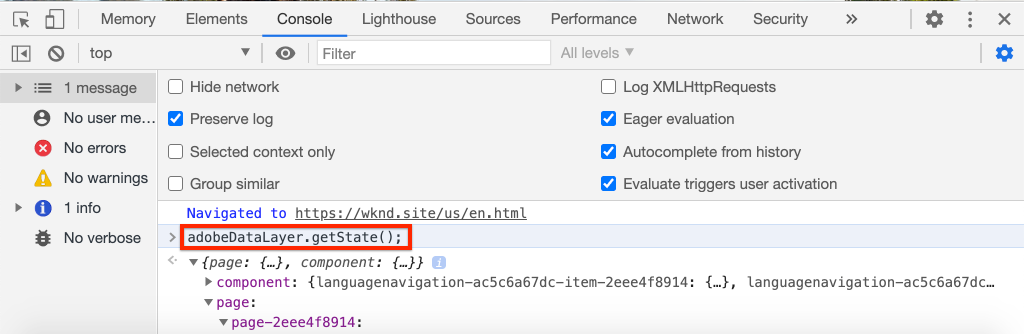
adobeDataLayer.getState() returns the component's state object — the keys
(dc:title, repo:path) your data elements will read.
AdobeDocs/experience-manager-learn.en · adobe-client-data-layer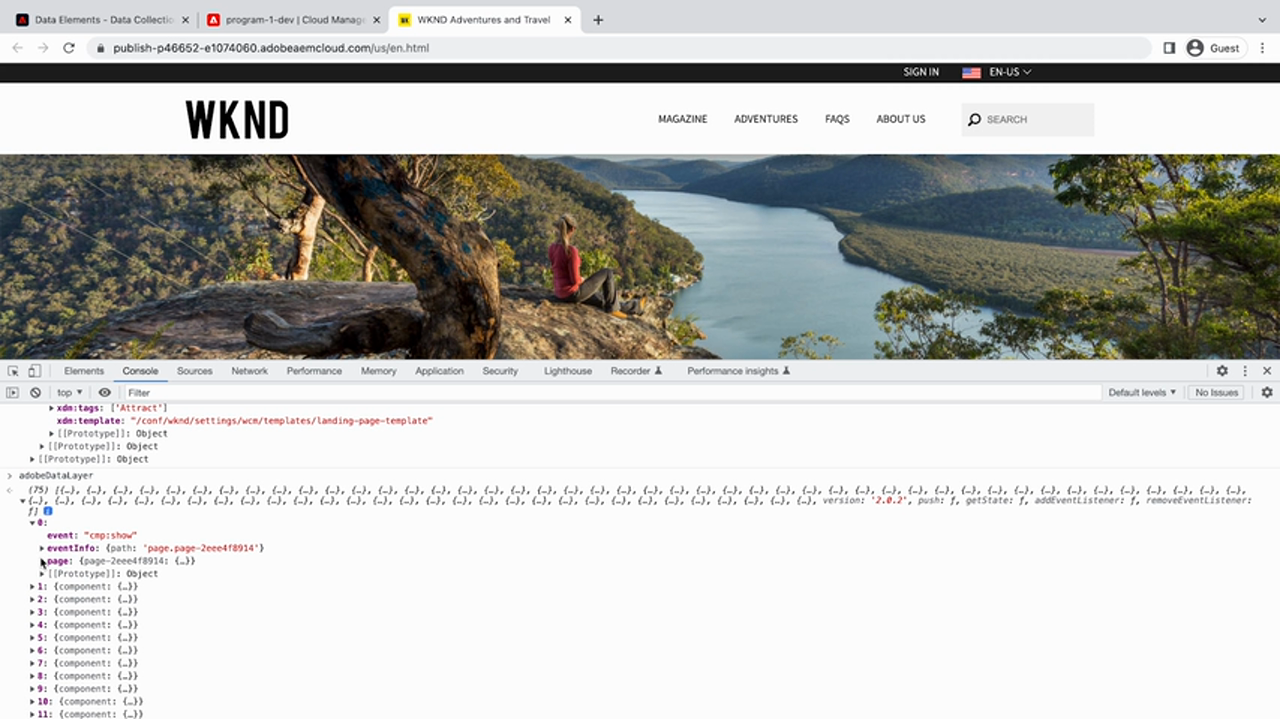
page-home — repo:type: "wknd/components/page", dc:title,
xdm:dictURL and friends. These are the exact keys a data element addresses.
Frame from Adobe tutorial video 3418896dc: is Dublin Core (title, description),
repo: is JCR/repository metadata (path, primary type), xdm: is already Experience
Platform vocabulary. When a component property is prefixed xdm:, it maps almost directly onto your
schema field — which is why AEM is unusually good to integrate with compared to a CMS with an ad-hoc data layer.
AEP Web SDK ExperienceEvent field group, with identityMap present as a Map. You know why it is a Map.Switch to AEP. You are creating the shape your web events will take. The tutorial's instruction is to build a schema and add Adobe's own field group AEP Web SDK ExperienceEvent rather than inventing fields — LIVE Integrate AEM Sites and Experience Platform Web SDK, "Create XDM Schema".
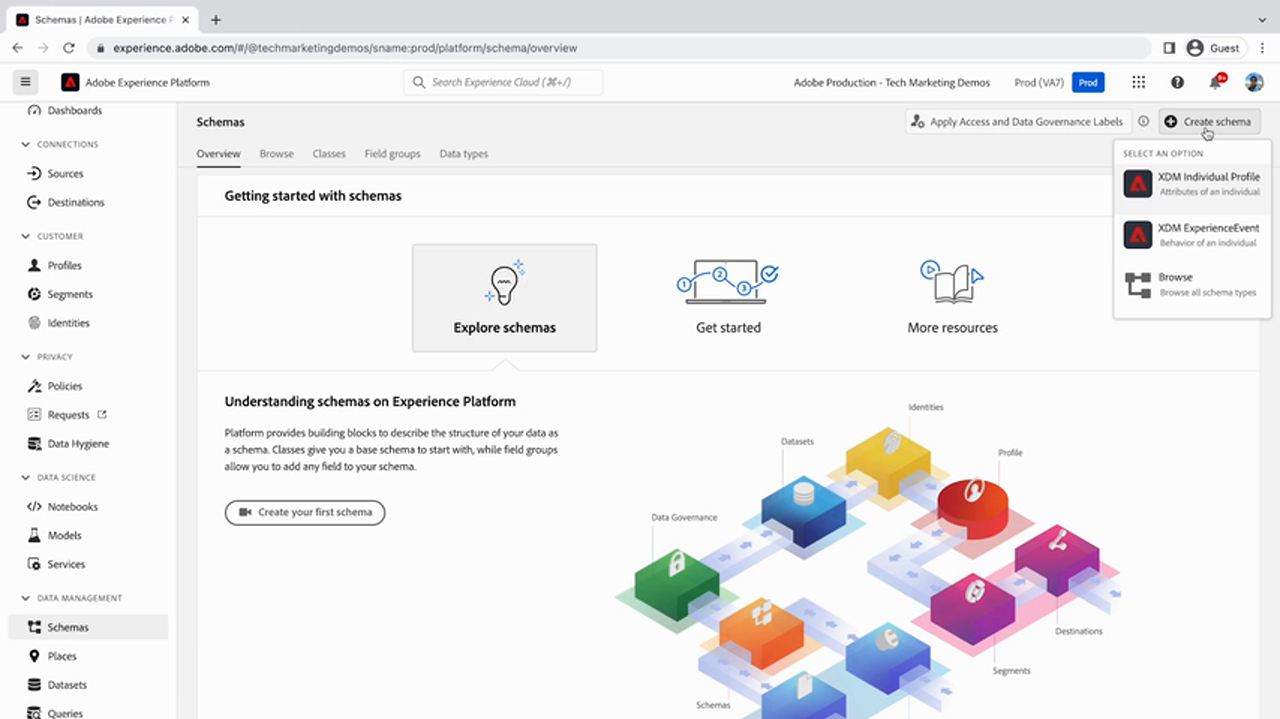
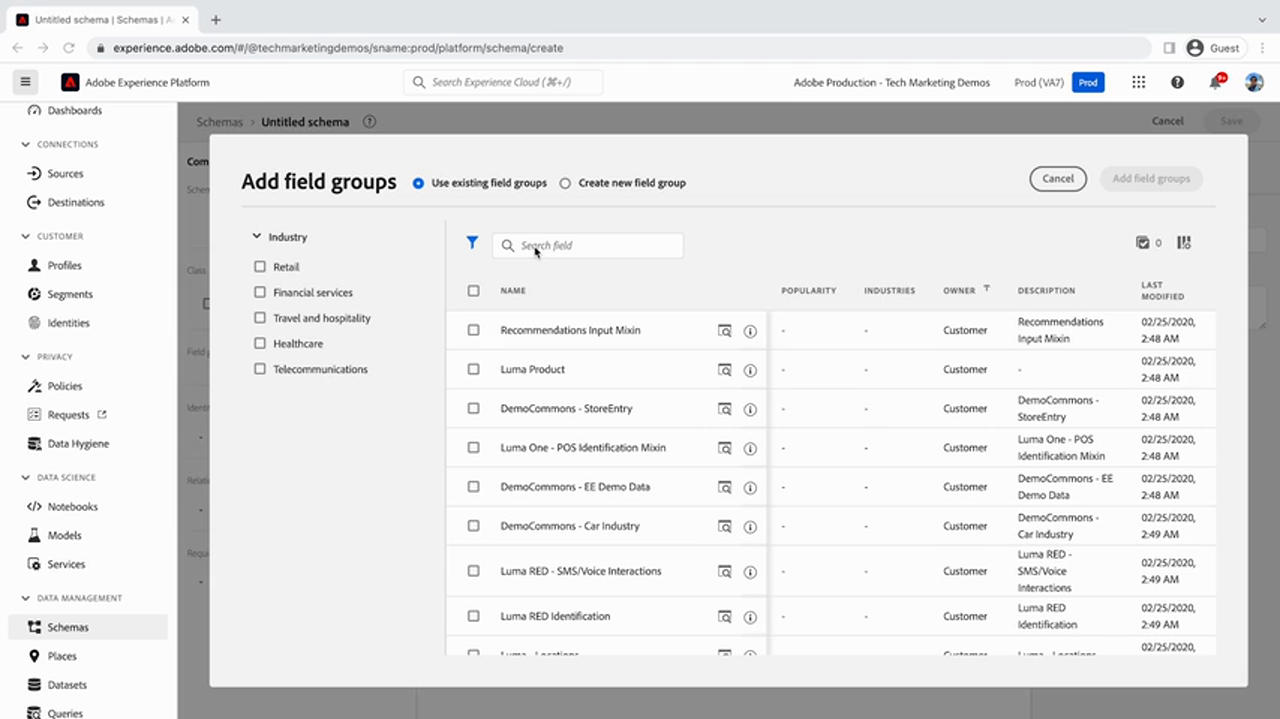
Select AEP Web SDK ExperienceEvent and preview it before committing:
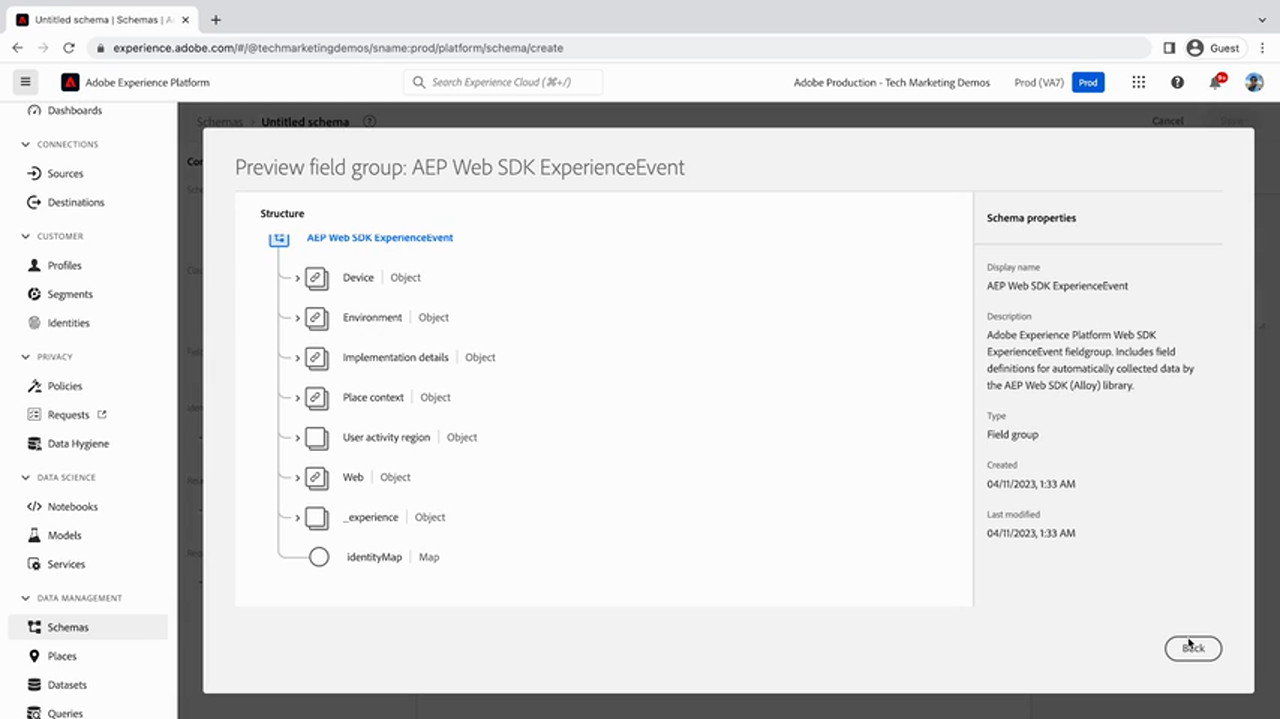
device, environment, placeContext, userActivity.region,
web, experience, identityMap) and its properties on the right.
This is the standard web-event skeleton Web SDK will populate.
Frame from Adobe tutorial video 3418894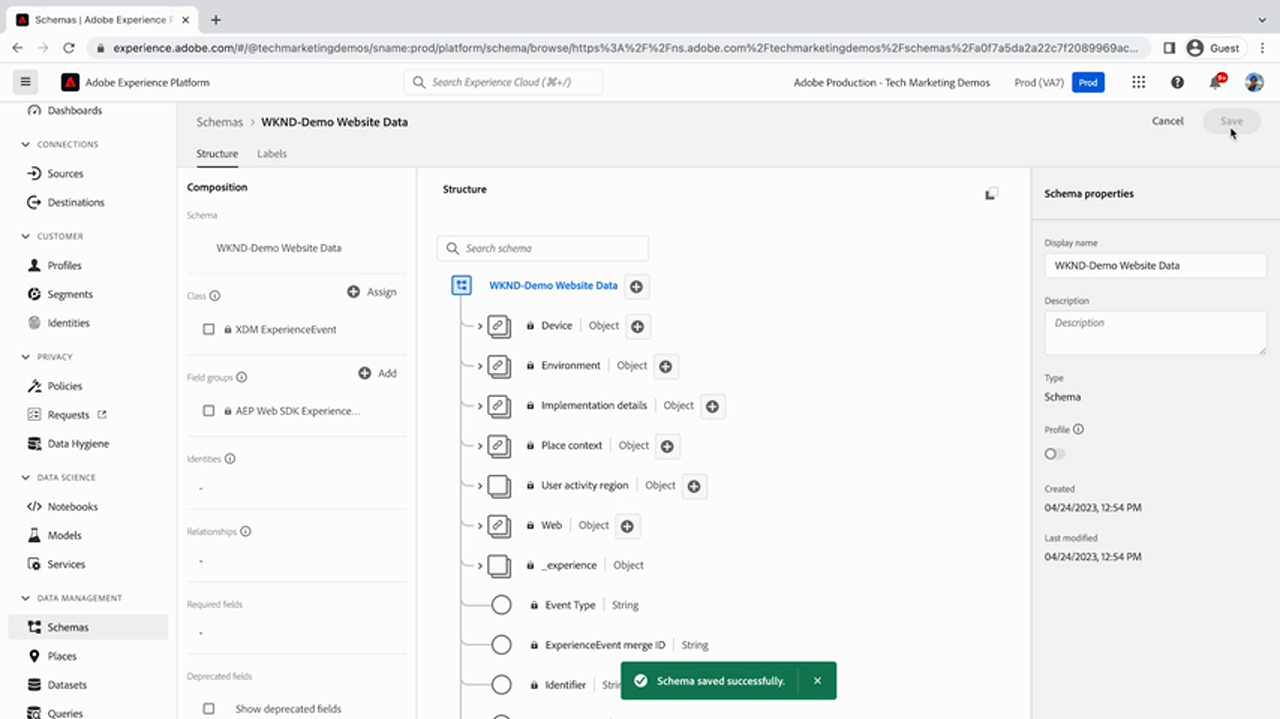
environment, device, placeContext, userActivity.region,
web.webInteraction, experience._id, timestamp,
experienceLanding, and identityMap as a Map.
Frame from Adobe tutorial video 3418894identityMap being a Map matters. It is not a field you set — it is where the namespaces
you configure in Step 5 land. One event can carry several identities at once (ECID plus your CRM key), and the Map
is the structure that allows it. This is the seam between "collection" and "identity resolution," and it is the
part of the chain your own design has opinions about (see the contract section).
identityMap is right there in the field group you just added.
T1 Confirmed in your own corpus at
AEP-04-xdm and visible in the screenshots above.
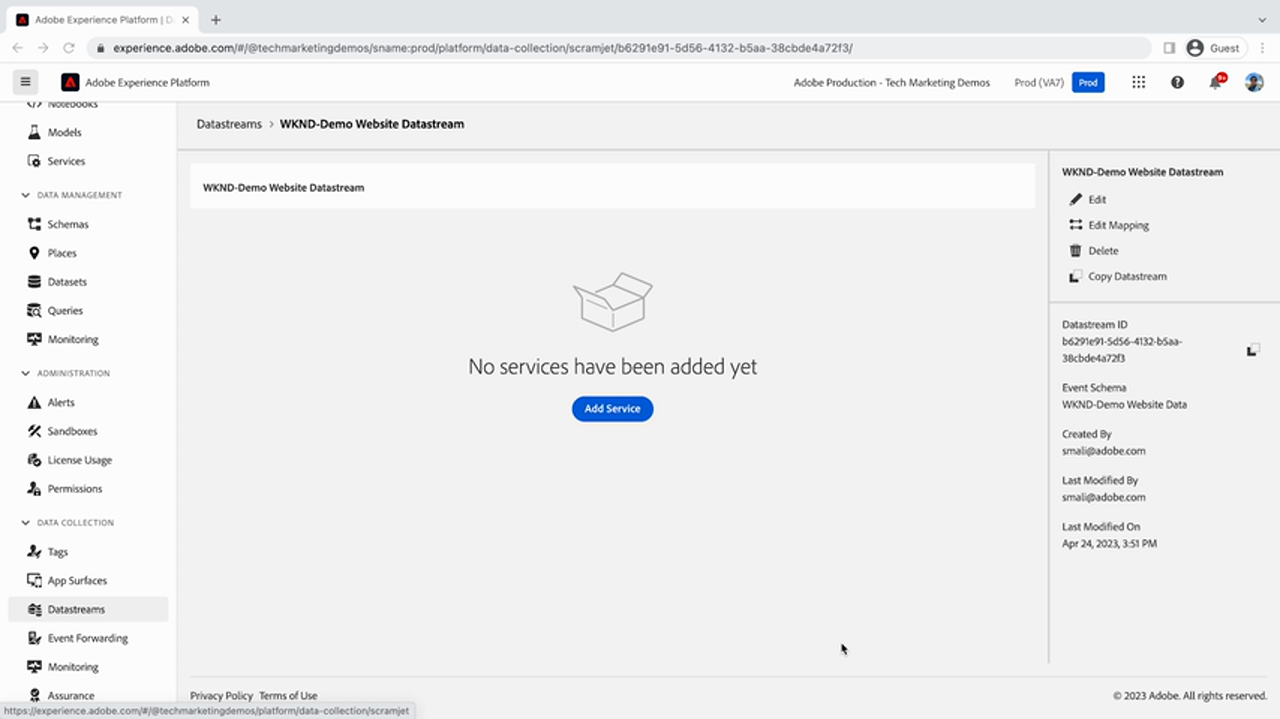
The datastream is the routing contract. Your corpus states its purpose plainly:
T1 AEP-02-sdk-01-01-AEP-datastreams.md — a datastream configures the
connection between the Edge Network and Experience Platform, and tells the Edge where to send collected data and
which sandbox it belongs to.
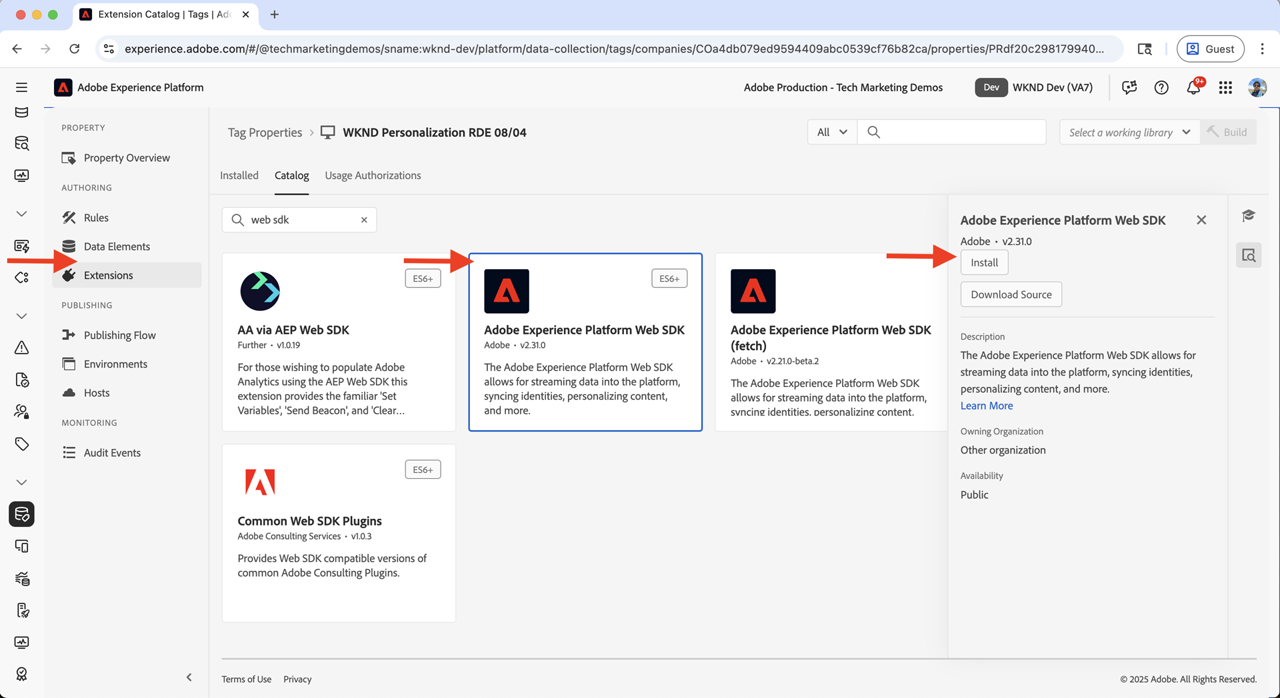
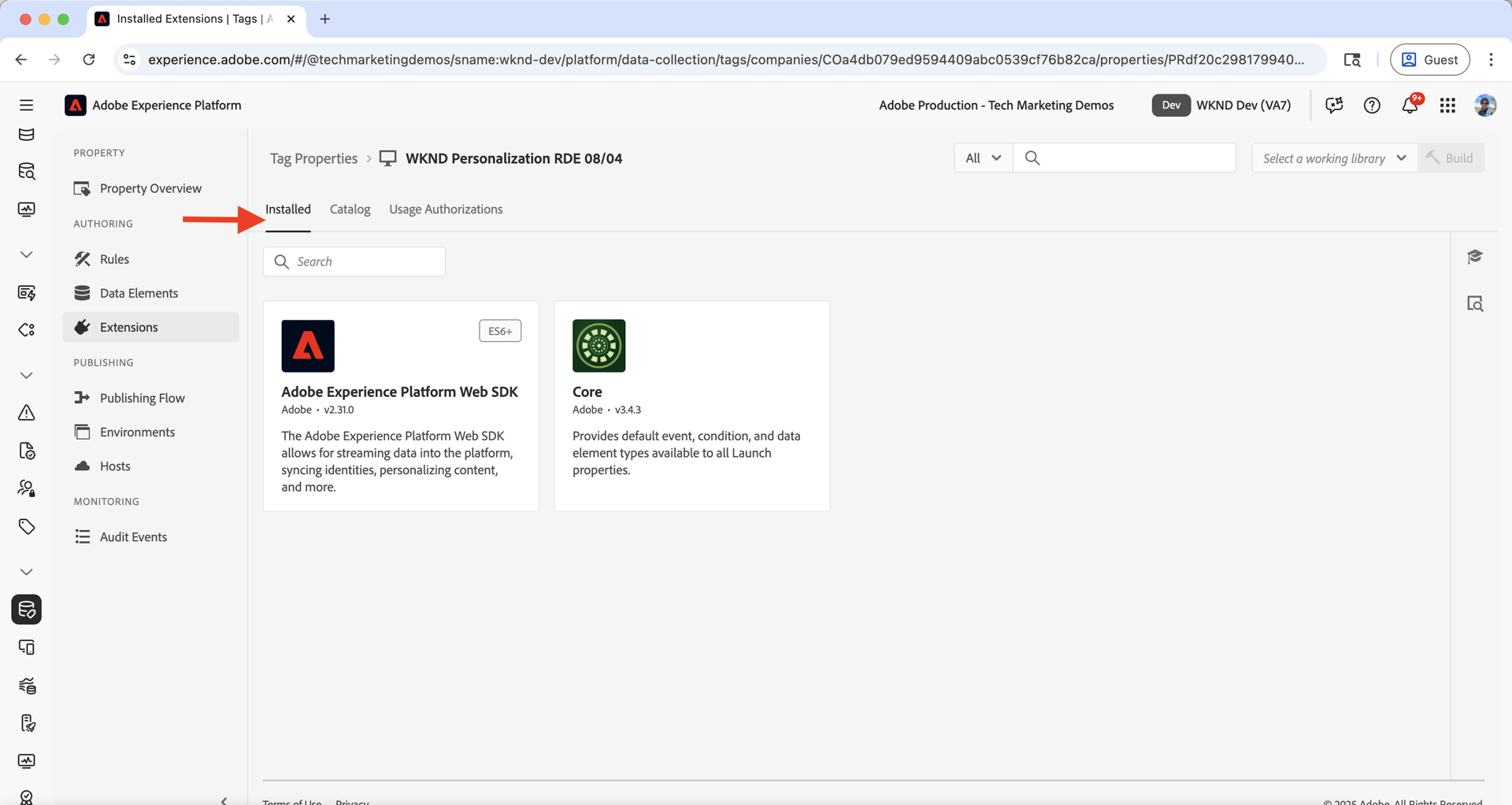
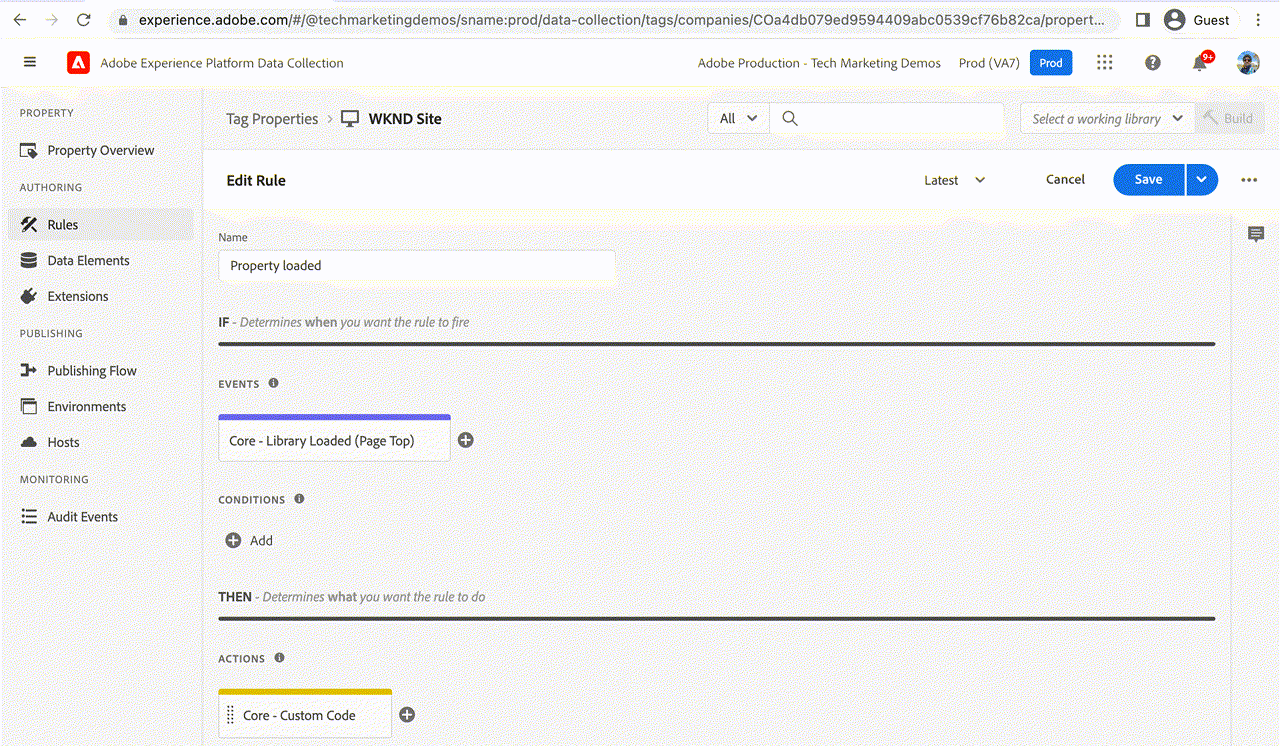
Now the tag container. Per the tutorial LIVE, the property needs two extensions —
Core and Adobe Experience Platform Web SDK — plus custom-code data elements for
page-name, site-section and host-name, an XDM Object data element bound to
the Step 3 schema, and one rule firing on the data layer's cmp:show event.
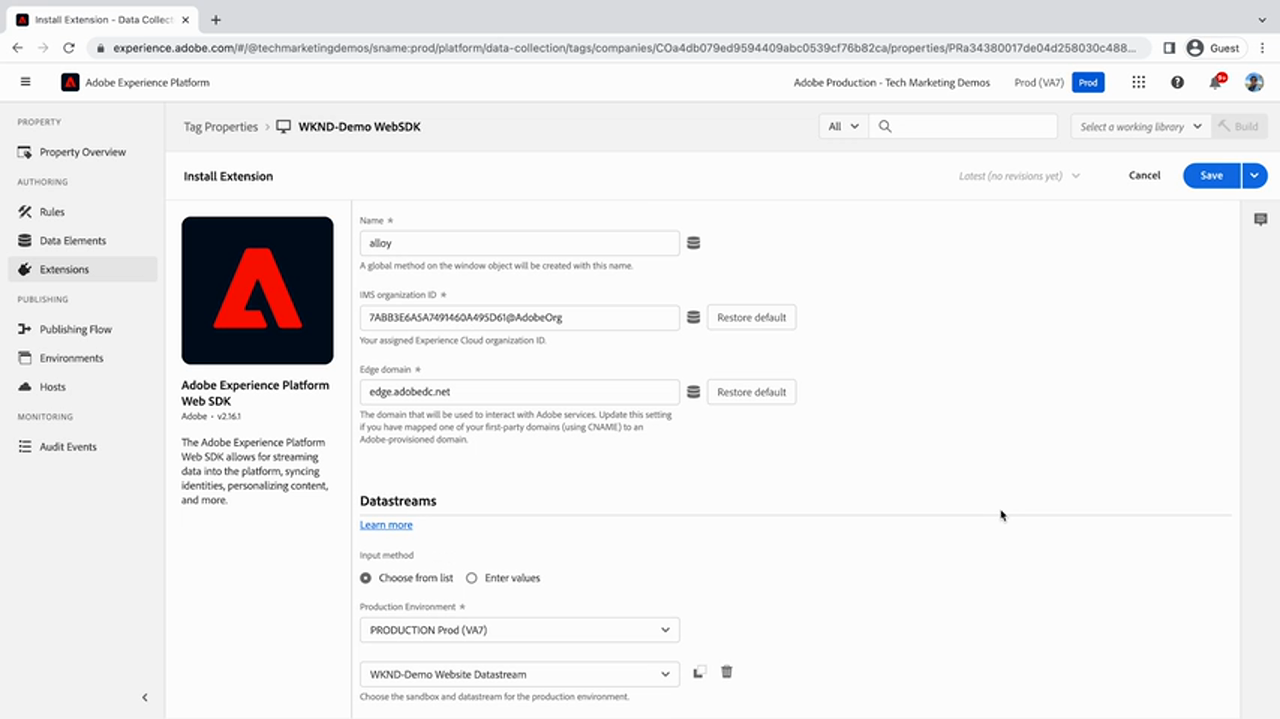
alloy, Edge base URL for event sending, Report collection endpoint,
Personalization decisions endpoint, Pageviews dataset. Datastreams: a
Select datastream control per environment — PROD and STAGE — here pointing at
WKND-Demo-Website-Datastream.
Frame from Adobe tutorial video 3418896Verbatim from the tutorial's accordion LIVE. These are custom-code data elements:
if (event && event.component && event.component.hasOwnProperty('dc:title')) {
    return event.component['dc:title'];
}let pagePath = event.component['repo:path'];
let siteSection = '';
// check for .html in the URL
if (pagePath.indexOf('.html') > -1) {
siteSection = pagePath.substring(0, pagePath.lastIndexOf('.html'));
siteSection = siteSection.replaceAll('/', ':'); // slash to colon
siteSection = siteSection.replaceAll(':content:', '');
}
return siteSection;if (window && window.location && window.location.hostname) {
return window.location.hostname;
}Notice what is happening: event.component is not a browser event — it is the data layer
component state, handed to the rule by the code in the next section. The rule's event, not the DOM, is the
data source.
cmp:showThe rule's custom event code is the bridge between AEM's data layer and the Tags rule engine. LIVE verbatim:
var pageShownEventHandler = function (evt) {
    // defensive coding to avoid a null pointer exception
    if (evt.hasOwnProperty("eventInfo") && evt.eventInfo.hasOwnProperty("path")) {
        console.debug("cmp:show event: " + evt.eventInfo.path);
        var event = {
            // path of the component that triggered the event
            path: evt.eventInfo.path,
            // state of the component that triggered the event
            component: window.adobeDataLayer.getState(evt.eventInfo.path)
        };
        // Trigger the Tags Rule, passing in the new 'event' object.
        // It is then referenced as 'event' by the data elements:
        //   e.g. event.component['dc:title']
        trigger(event);
    }
}

// set the namespace to avoid a potential race condition
window.adobeDataLayer = window.adobeDataLayer || [];
window.adobeDataLayer.push(function (dl) {
    dl.addEventListener("cmp:show", pageShownEventHandler);
});getState(path) rather than reading a pushed payload. The event carries only a
path; the handler looks the state up. That keeps events small and means late-arriving component data is
still correct at read time.
② The namespace guard window.adobeDataLayer = window.adobeDataLayer || [] exists to avoid a
race condition — the tag can load before the page has established the layer.
③ trigger(event) is the seam: it hands the object to Tags, where the reserved name
event makes it reachable from every data element.
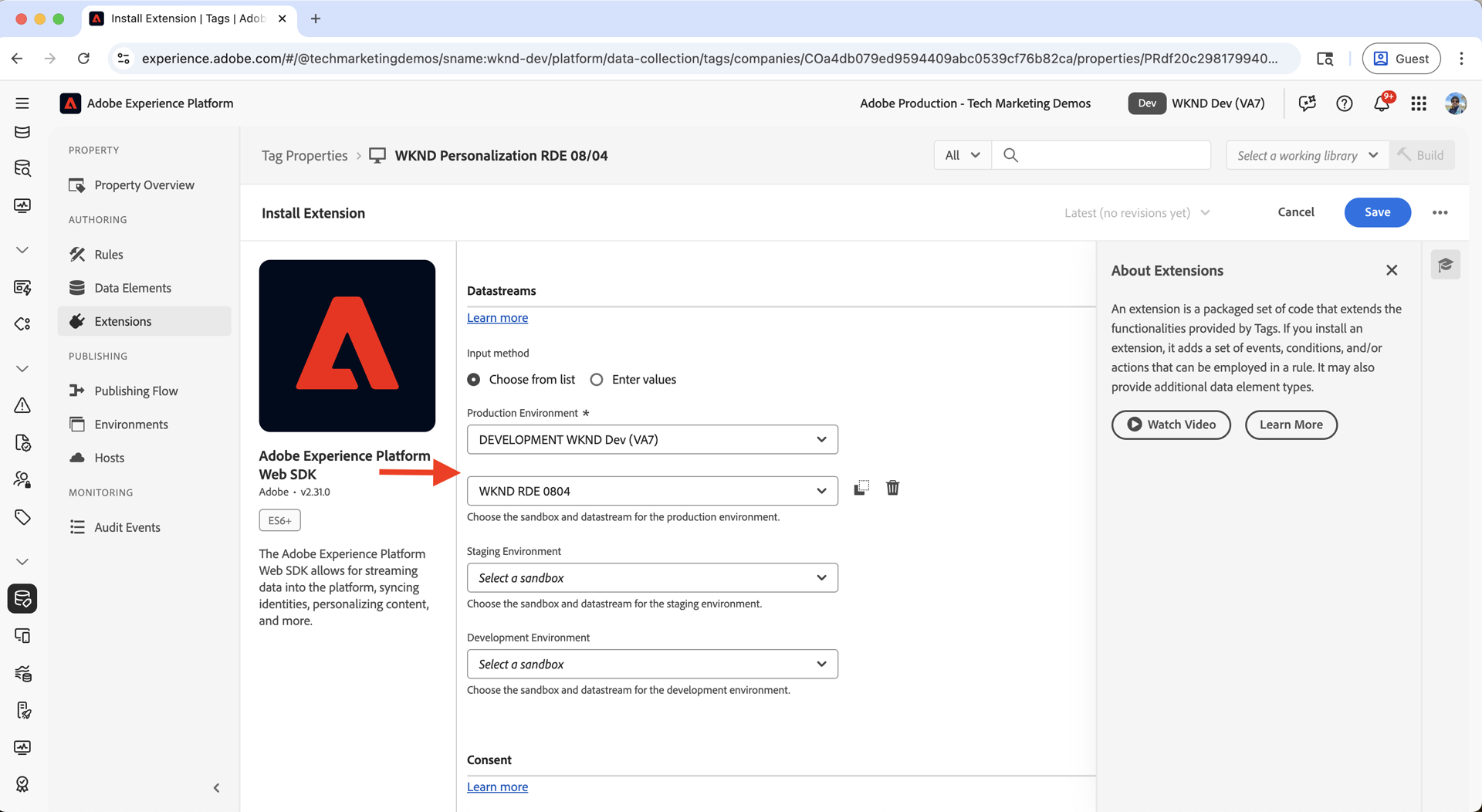
alloy and binds it to a datastream per environment (PROD / STAGE). If a colleague binds PROD to the wrong datastream, what breaks — and where does the error surface?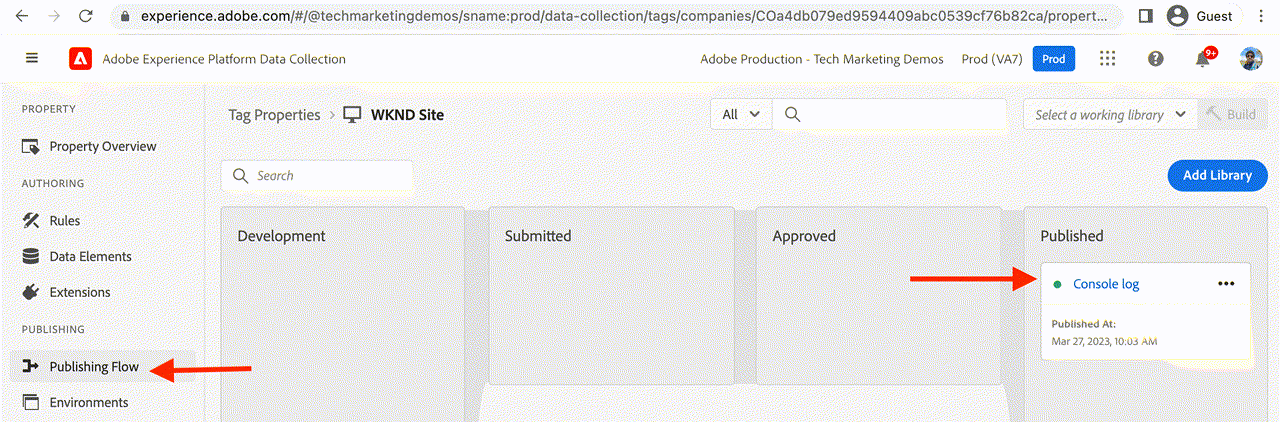
_satellite object on the page.This is the AEM-specific hop, and the one your corpus cannot help you with at all. The mechanism is an Adobe IMS service credential plus a Tags in Adobe Experience Platform cloud services configuration in AEM. LIVE
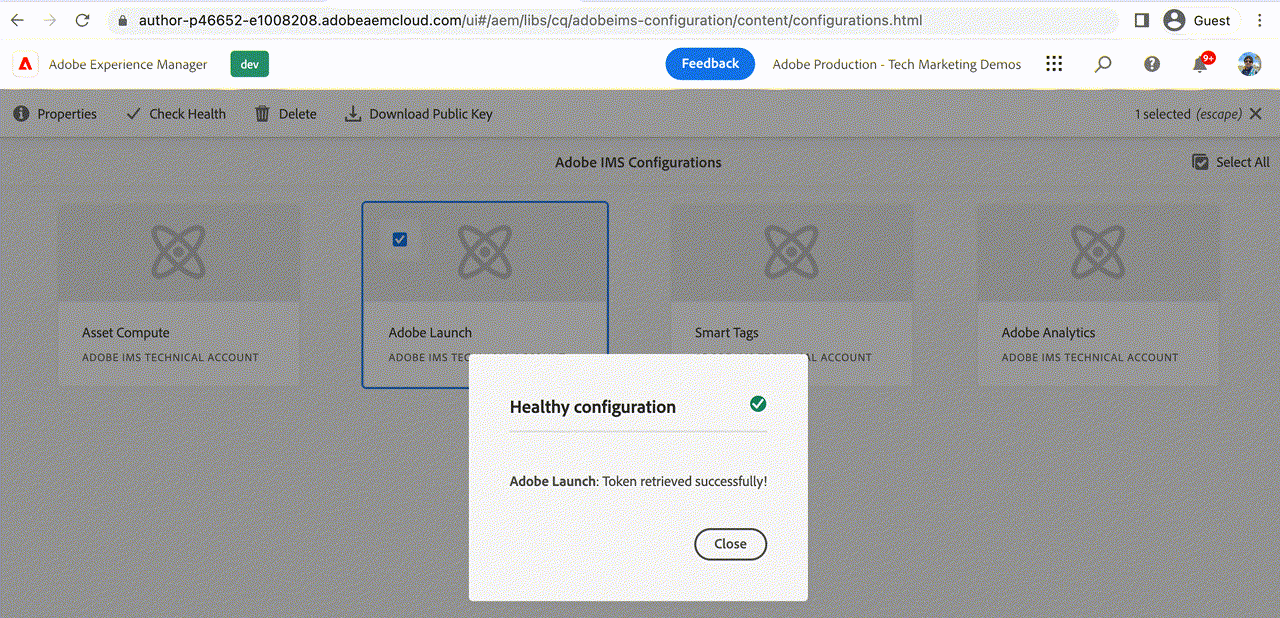
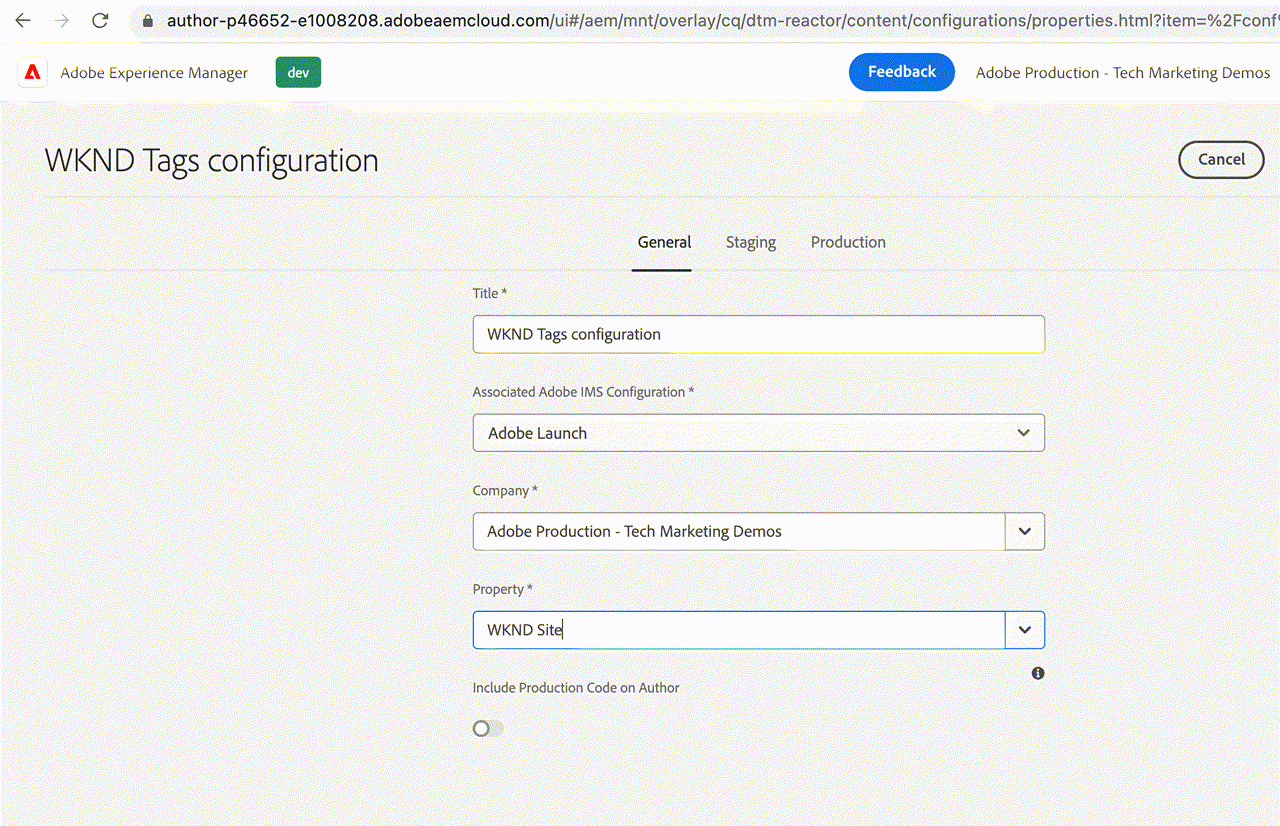
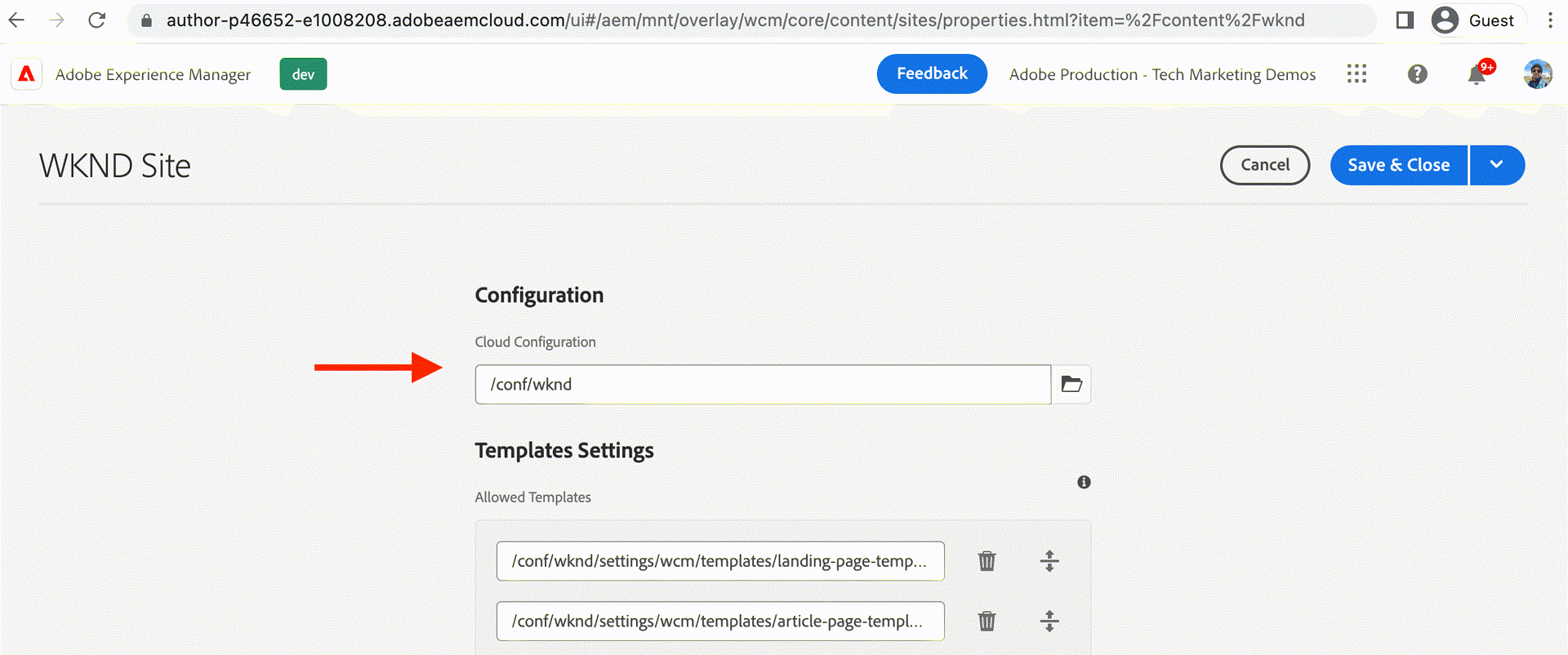
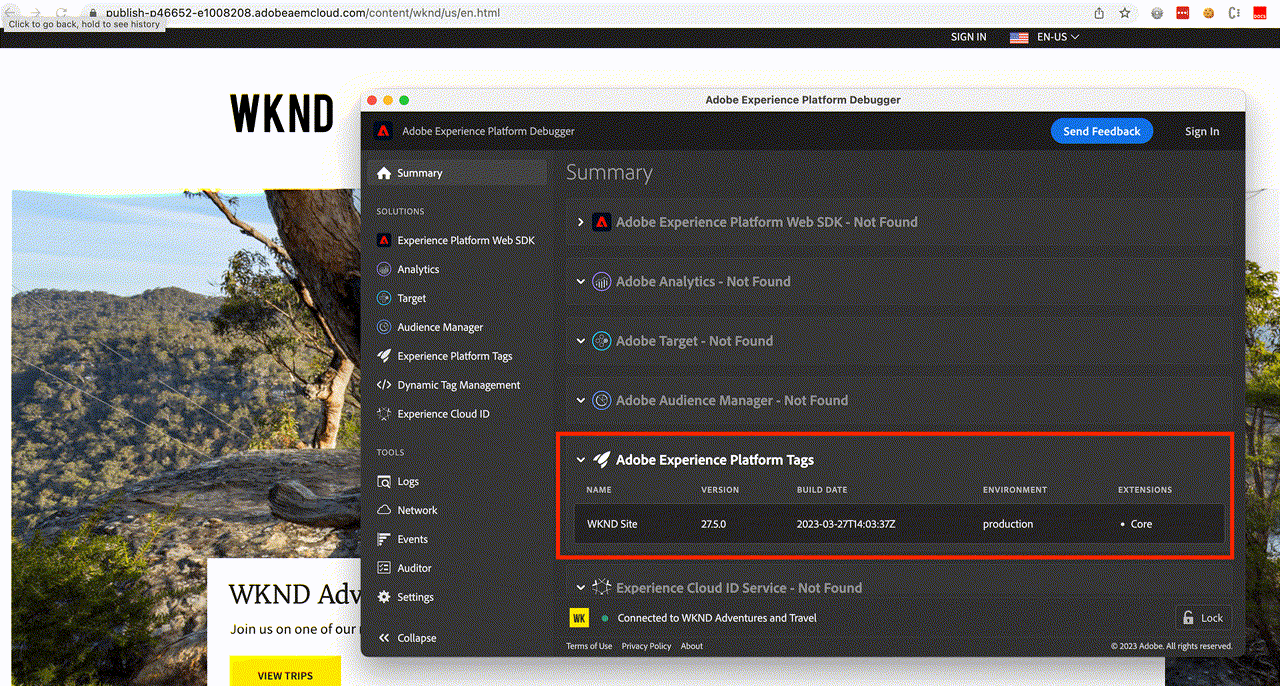
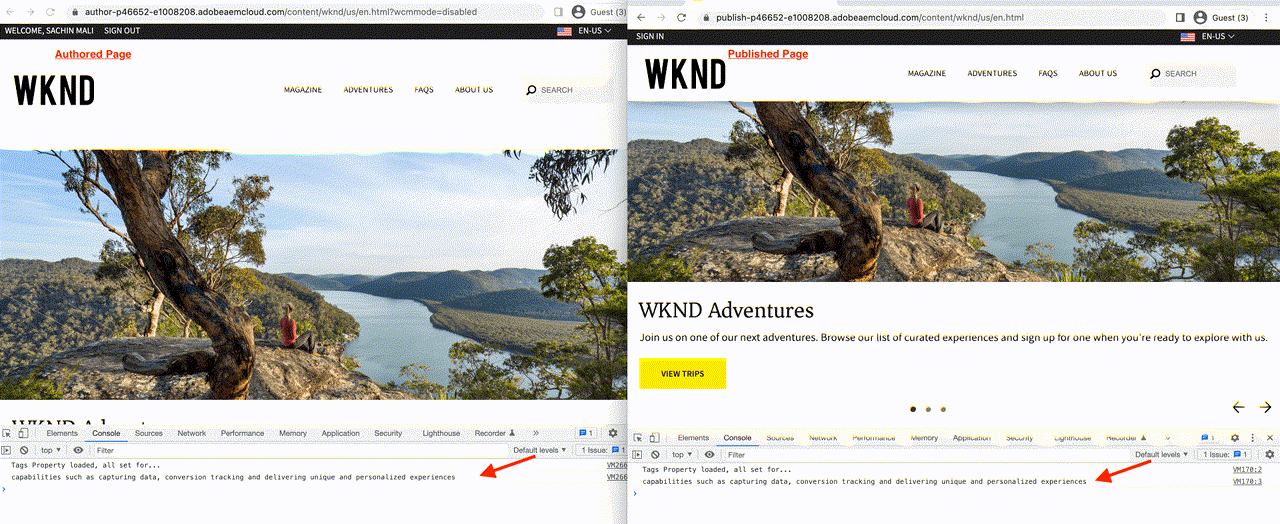
Once bound, AEM injects the published tag library into the page — on both author and publish instances:
Nothing collected so far has anywhere to be stored. Your corpus describes a dataset as
"a storage and management construct for a collection of data like a database table that follows a schema"
T1 AEP-05-datasets.
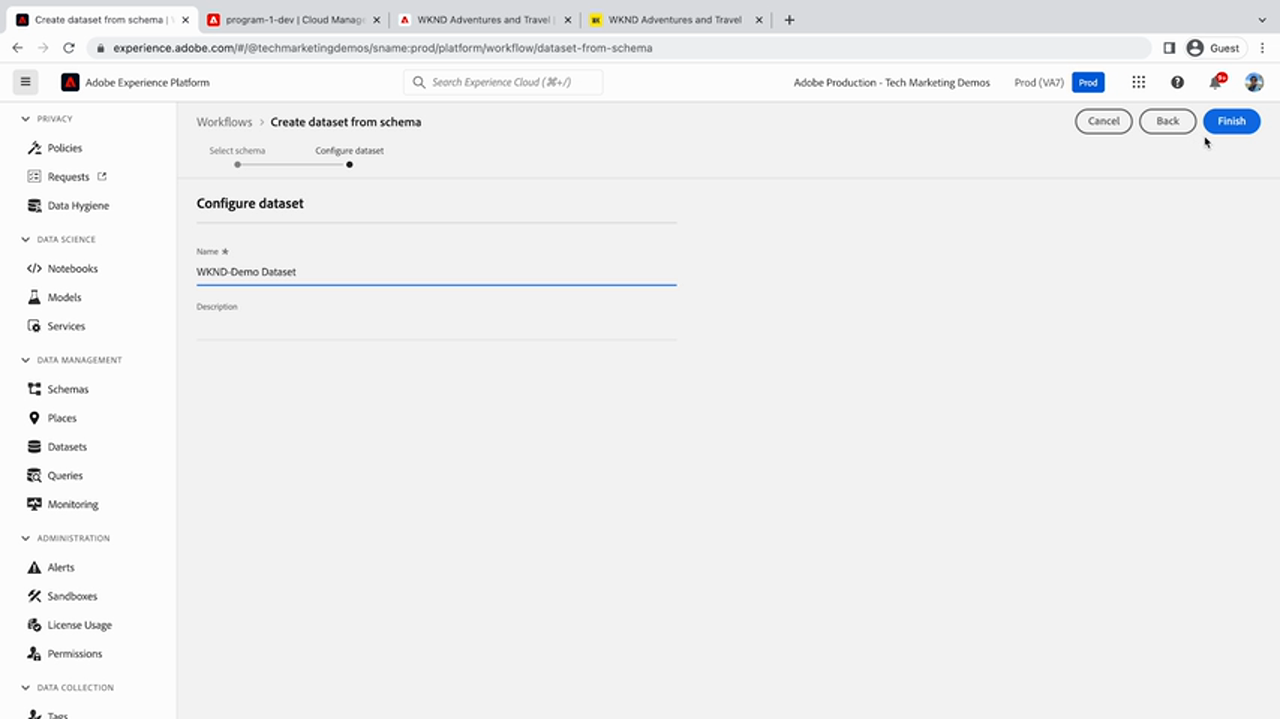
WKND-Demo-Dataset, plus Description. The schema is chosen in the step before this screen.
Frame from Adobe tutorial video 3418898Then go back to the datastream and attach it — this is the "Add Service" screen the Step 4 screenshot showed empty:
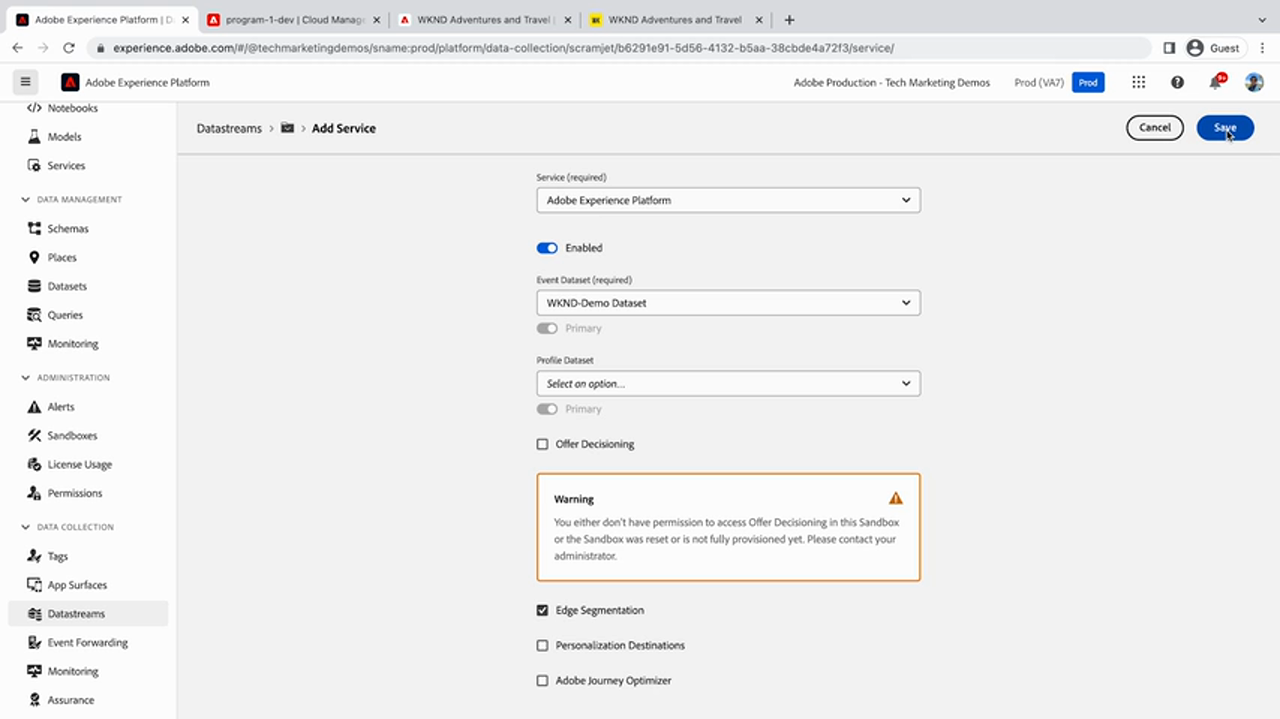
WKND-Demo-Dataset. Batch Size. Then a set of optional services —
Offer Decisioning (unchecked, with an amber warning), Edge Augmentation,
Personalization Destinations, Adobe Journey Optimizer.
Frame from Adobe tutorial video 3418898Browse the WKND site — the tutorial's point is that you must actually produce events, then confirm the platform received them. This is the step that turns a configuration exercise into evidence.
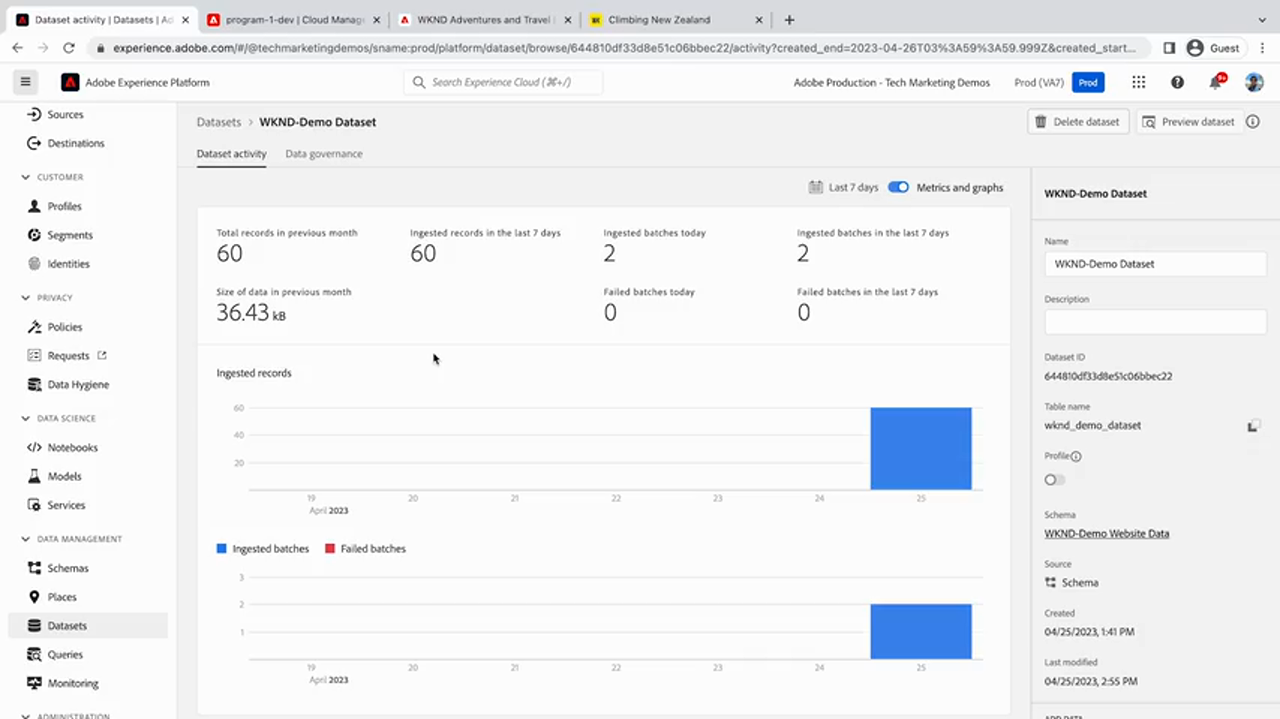
WKND-Demo-Website-Data, created and last-modified dates.
Frame from Adobe tutorial video 3418899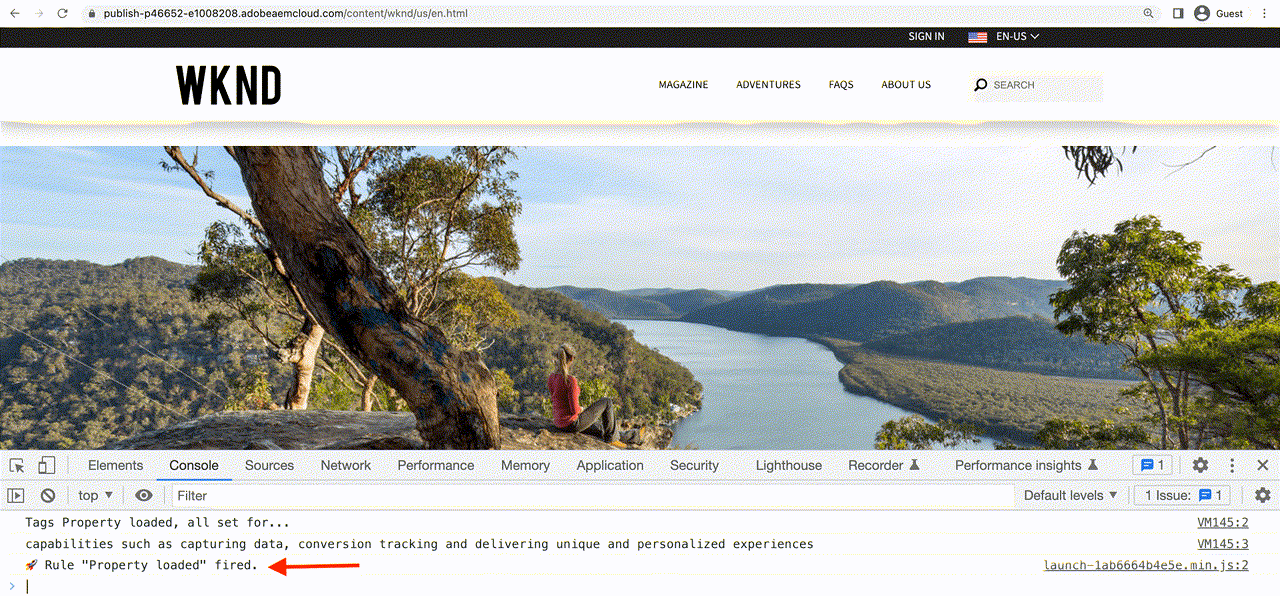
_satellite in the console. Its presence confirms the tag library
loaded; _satellite.buildInfo tells you which library and environment.
AdobeDocs · data-collection/tags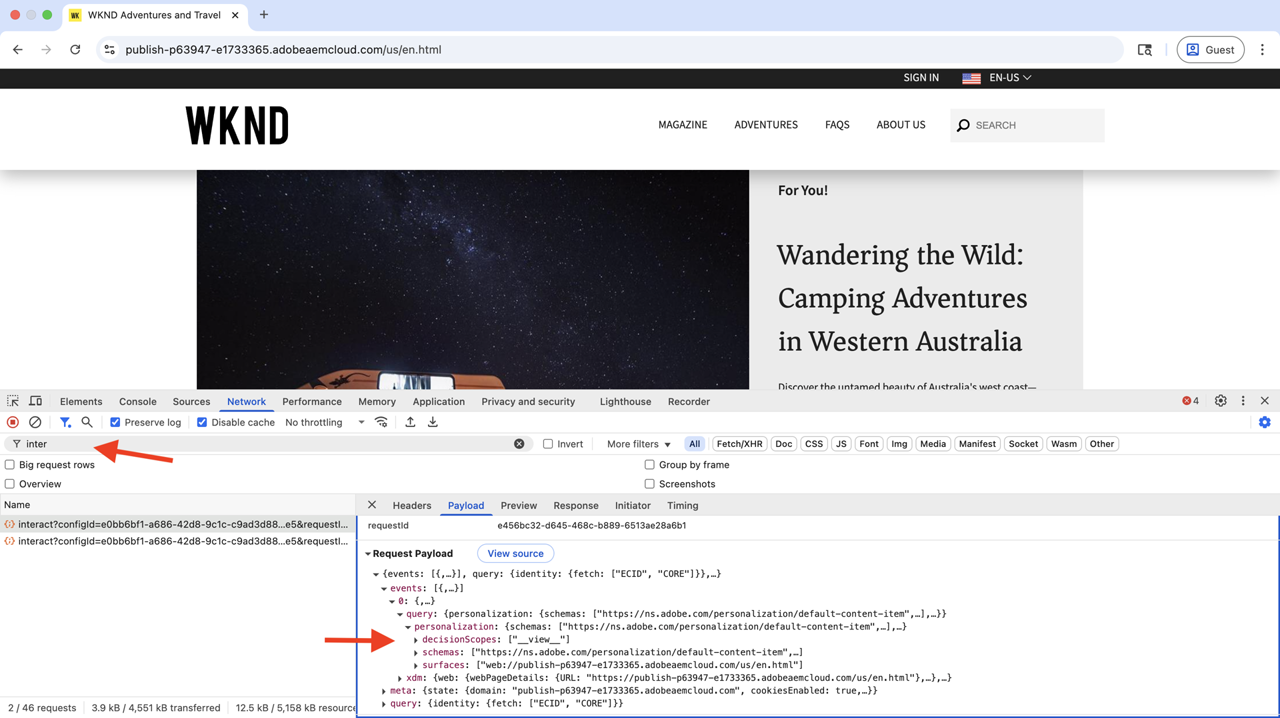
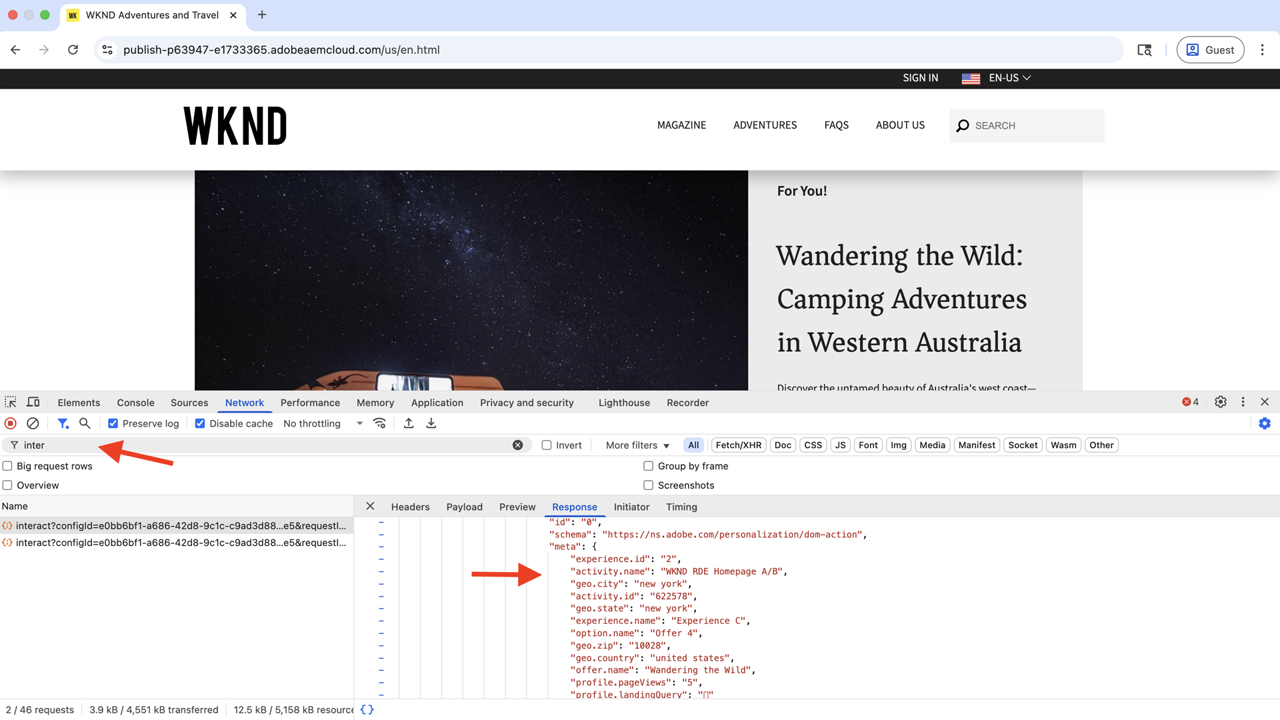
The tutorial lists exactly what to verify with the Experience Platform Debugger Chrome extension LIVE:
events attribute in the Web SDK request| Symptom | Usual cause | Where to look |
|---|---|---|
| No request to Edge at all | Cloud services configuration not applied to the site root, or library not published to that environment | Step 6 · _satellite.buildInfo |
| Request fires, fields empty | Data element reading a key the component does not emit, or cmp:show not firing for that component | Step 5 · getState() in console |
window.adobeDataLayer undefined | Not Core Components, or AEM version without the data layer, or a custom template | Step 2 |
| Events accepted, nothing in dataset | Datastream has no service bound, or bound to a different sandbox | Step 7 Add Service · Step 4 sandbox |
| Failed batches > 0 | Payload does not validate against the schema — usually a type mismatch or a field outside the field group | Dataset activity · schema structure |
| Service toggle greyed out | Licensing or sandbox provisioning, not an implementation error | Step 7 warning |
| Wrong identity on the profile | Namespace not configured, or authenticated ID not being sent on the event | identityMap in the payload |
02-MY-PROFILE.md. It is defensible. It is not an Adobe requirement, and Adobe's default guidance does
not necessarily agree with it.
Your stated contract for the production Web SDK layer: an authenticated event carries ECID plus Contact ID, Contact ID is primary, and consent is collected before activation. Map that onto what you have just seen:
| Contract element | Where it is physically implemented | Honest status |
|---|---|---|
| ECID present on the event | Web SDK does this automatically; lands in identityMap | Product behaviour T1 |
| Contact ID on the same event | A data element reading the authenticated user's state, mapped into identityMap with your namespace | Your design T3 |
| Contact ID as primary | Identity namespace configuration in AEP, plus the primary flag on the identity in the payload | Your design T3 |
| Consent before activation | Web SDK consent options / identity cookie behaviour, gated by the data layer's consent state | Mechanism T1, policy T3 |
AEP-06-identity) but not in this
walkthrough. So if you are asked "how does Contact ID become primary?", the honest answer is:
the namespace is configured in Platform and the event carries it in identityMap — I have designed
that contract, the web team implements the SDK configuration. Do not let a smooth collection walkthrough
imply you have done the identity part.
Stating these is more useful than pretending coverage.
xdm: field-group mapping detail is thin. How each AEM data layer key maps to each XDM
field is where real implementations get argued about, and neither the dump nor this tutorial gives a table.| Tier | Source | Used for |
|---|---|---|
| LIVE | Integrate AEM Sites and Experience Platform Web SDK — Experience League | The 8-step sequence, prerequisites, data element and rule code, IMS/Tags connection |
| LIVE | AdobeDocs/experience-manager-learn.en — help/sites/integrations/… | 16 published UI screenshots; the tutorial markdown source |
| LIVE | Adobe tutorial videos 3418856, 3418894, 3418895, 3418896, 3418897, 3418898, 3418899 | 13 frames extracted with ffmpeg and inspected individually |
| T1 | corpus/AEP-10-platform/AEP-10-platform-14…web-sdk-tutorial.md | Web SDK definition, permissions list, tutorial scope |
| T1 | corpus/AEP-02-sdk/AEP-02-sdk-01-01-AEP-datastreams.md | Datastream purpose and routing role |
| T1 | corpus/AEP-05-datasets/ | Dataset definition |
| T1 | corpus/AEP-04-xdm/ | ExperienceEvent carrying identity — the correction in Step 3 |
| T3 | 02-MY-PROFILE.md | The identity contract and the Operator/dimension design commentary |
Retrieval dates. Corpus documents 2026-10-18. Live sources retrieved 2026-10-19. AEM tutorial last substantial update 2023-04-26. Numeric limits and UI labels move between releases — verify anything load-bearing against the live page before repeating it.